iOS 18 · iPhone · iPad

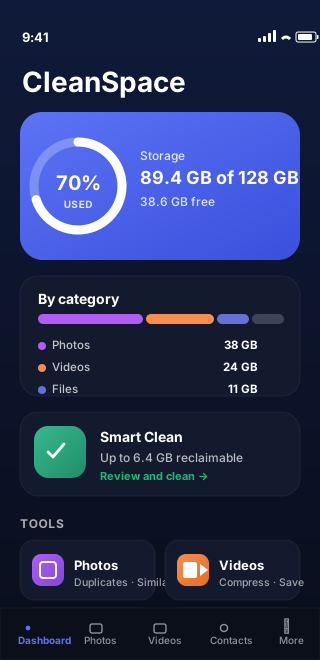
Your iPhone is 89% full. We can fix that — honestly.

CleanSpacePhone finds the photos, videos, contacts and files you can safely remove — entirely on your device. No account. No tracking. No fake "clear other apps' cache" claims.

  • 100% on-device analysis
  • Photo deletions go through Recently Deleted
  • AES-256 vault with Face ID
  • 100+ languages
100% of scans run on your device — no exceptions.
0 third-party analytics SDKs in the binary.
30-day undo on every photo deletion via Recently Deleted.
108 languages and regional variants from day one.
Six tools, one app

Everything an iPhone cleaner can do — done right.

No fake claims. CleanSpacePhone focuses on the things iOS actually allows third-party apps to clean, and does each one carefully.

Duplicate & similar photos

Exact duplicates bucketed by size + dimensions, then perceptual hashing (dHash) finds visually similar shots. Pick the "best" with one tap.

  • Burst, Live Photo and screenshot detection
  • Best-shot heuristic with manual override
  • Works with Limited Photos access

Video compression

HEVC compression with AVAssetExportSession. Validate the smaller copy before you decide to delete the original.

  • 4K → 1080p HEVC preset
  • Shows exact bytes saved per video
  • You confirm every deletion

Duplicate contacts

Normalized phone numbers and emails plus name similarity catch obvious duplicates. Review each group and pick what to keep.

  • Phone digit normalization across international formats
  • Email lower-cased + trimmed
  • Union-find groups transitive duplicates

Files & folders

Pick a folder in iCloud Drive or "On My iPhone". CleanSpacePhone scans only inside it, using security-scoped bookmarks.

  • SHA-256 duplicate detection (size-bucketed for speed)
  • Largest and oldest files lists
  • No background access — strictly scoped

Secure Vault

Move sensitive photos into an AES-256-GCM encrypted container. Key lives in the iOS Keychain, gated by Face ID, Touch ID or your passcode.

  • CryptoKit AES-GCM sealing
  • kSecAttrAccessibleAfterFirstUnlockThisDeviceOnly
  • Biometric re-auth on every open

Storage habits

Set a free-space goal. CleanSpacePhone checks on app open and posts a local notification when you're below your target — never silently.

  • No background scanning
  • Notifications are local, never remote
  • Disable anytime in one tap
How it works

Three steps. Nothing leaves the device.

  1. 1

    Scan

    Tap "Start scan". CleanSpacePhone uses Apple's Photos, Contacts and Files frameworks to read what it needs — and only what it needs.

  2. 2

    Review

    See every duplicate group, every large video and every recommended "best shot" before anything changes. You always have the final say.

  3. 3

    Free space

    Deletions land in Photos › Recently Deleted. Files only go from folders you picked. Vault stays encrypted at rest.

Privacy promise

If we can't do it honestly, we don't ship it.

Most "iPhone cleaners" promise to clear other apps' caches, junk files, or RAM. iOS sandboxing makes that impossible — and we won't pretend otherwise. Here's exactly what CleanSpacePhone does not do:

  • No third-party app cache "cleaning" (iOS sandboxing blocks this)
  • No RAM "boost" or system optimisation tricks
  • No background scanning, ever
  • No analytics SDKs, no ads, no third-party trackers
  • No accounts, no email, no cloud sync
Read the full privacy policy →
CleanSpacePhone App Privacy

Data Not Collected

The developer does not collect any data from this app.

Data Linked to You

Network Activity

No domains contacted

Source: iOS Settings · App Privacy Report
Why we wrote it this way

Most "iPhone cleaners" lie. We didn't want to be one.

Typical cleaner ad
"Free up to 80% of RAM! Clear all junk files from other apps! Boost your iPhone 5×! One-tap optimization for batteries, cache and storage."
  • iOS sandboxing blocks all of these
  • Usually paired with trackers
CleanSpacePhone
"Find duplicate and similar photos. Compress big videos. Merge duplicate contacts. Scan a folder you pick. Lock photos in an AES-256 vault. That's it — and it's all on your device."
  • Only ships features iOS actually allows
  • Reversible deletions via Recently Deleted

CleanSpacePhone vs. the typical "iPhone cleaner"

  CleanSpacePhone Typical cleaner
Scans on-device Always Often uploads
Account required Never Usually
Third-party analytics None Several SDKs
"Clears other apps' caches" Honest "no" — iOS blocks it Often claimed (false)
Photo deletion path Recently Deleted (reversible) Varies
Encrypted vault AES-256 + Keychain key Often plain folder
Questions

Frequently asked questions

Does CleanSpacePhone send my photos to a server?

No. Every scan — duplicates, similarity, screenshots, large videos, contacts, files — happens entirely on your iPhone. The app makes no network calls for analysis and ships with no analytics SDKs, ads, or third-party trackers.

Are deleted photos really gone?

No. All photo deletions go through Apple's Photos framework, which places items in Photos › Recently Deleted. You can restore them for 30 days. CleanSpacePhone never silently removes data.

Can the app clean other apps' caches?

No, and no iPhone cleaner can. iOS sandboxes each app — no third-party app is allowed to read or delete another app's data. CleanSpacePhone only touches the things iOS actually allows: your Photos library, your Contacts and Calendar, folders you explicitly pick in the Files picker, and the app's own encrypted vault. Anything else would be a false claim.

How does duplicate photo detection work?

Exact duplicates are bucketed by file size and pixel dimensions. Visually similar shots are grouped using a 64-bit perceptual hash (dHash) compared with Hamming distance — the same family of techniques used in image-similarity research. Everything runs locally with Swift Concurrency.

Is the Secure Vault really encrypted?

Yes. Items are encrypted with AES-256 GCM via Apple's CryptoKit. The symmetric key is stored in your iOS Keychain with kSecAttrAccessibleAfterFirstUnlockThisDeviceOnly, so it never leaves the device and is gated by your device passcode.

Does it work with Limited Photos access?

Yes. With Limited Photos access, CleanSpacePhone analyzes only the photos you chose to share, and offers a clear prompt to add more if that would help free up more space.

What languages is the app available in?

Over 100 languages and regional variants, including English, French, German, Spanish, Italian, Portuguese, Japanese, Simplified and Traditional Chinese, Russian, Korean, Arabic, Hebrew, Hindi, plus minority languages like Breton, Cornish, Occitan, Welsh, Irish, Scottish Gaelic and more.

Is the app free?

CleanSpacePhone 1.0 is free to download. Some advanced features may be offered as one-time unlocks or subscriptions in future updates; the privacy stance never changes — no analytics, no accounts, no tracking.
Available soon on the App Store

Free up space without giving up your privacy.

Download CleanSpacePhone and reclaim gigabytes of photos, videos and files — locally, reversibly, on your terms.

Requires iOS 17 or later. iPhone and iPad. Free.